

Workora Design FAQ’S
A calm space for simple, clear answers.
If you’re looking for something specific, these gentle prompts may help.
Workora Design FAQ’s is a calm space for clarity and reassurance. Each answer reflects Workora Design’s values of comfort, transparency, and focus — helping you find simple guidance without overwhelm.
General Questions
Workora Design
What is Workora Design?
Workora design is a calm, human‑centred space focused on ergonomics, wellbeing, and thoughtful design. Everything we create is shaped to help you work with more ease, clarity, and comfort.
How can I contact Workora Design?
You’re welcome to reach out through our contact form or email us at info@workora.design.
We read every message with care and reply thoughtfully.
Do you offer personalised ergonomic advice?
Not at this time.
Workora provides general guidance designed to support awareness, comfort, and healthier work habits — not individual assessments or medical recommendations.
Workspace & Ergonomics
How do I know if my setup is comfortable?
Comfort usually shows up as ease — relaxed shoulders, natural breathing, and no strain in your neck, back, or wrists.
Our Quick Tips and Guides offer simple ways to check your posture and adjust your workspace.
Do you recommend specific products?
We occasionally suggest items that support comfort and alignment, but we don’t promote anything we wouldn’t use ourselves.
Our focus is on principles first, products second.
Can I share Workora guides with others?
Yes — you’re welcome to share our articles and Quick Tips with proper credit.
For commercial use or republishing, please contact us first.
Privacy & Use
Do you use my information for anything other than replying?
No.
We only use your details to respond directly to your message. Nothing more.
How often do you send updates or newsletters?
Only when we have something genuinely useful to share.
No weekly blasts, no noise — just occasional, thoughtful updates.
Business & Collaboration
Do you work with businesses or teams?
Yes — we occasionally support small teams and organisations looking to create calmer, more ergonomic work environments.
If you’re exploring this, you’re welcome to reach out and we can discuss what you need.
Can I collaborate with Workora?
We welcome partnerships that align with calm, human‑centred design and wellbeing.
If you’re considering a collaboration, feel free to contact us.
Workspace Questions
Office Chairs & Seating FAQs
Comfort begins with how your chair meets your body. These answers offer simple ways to feel more supported and at ease.
A good chair supports your lower back, allows your hips to sit level, and keeps your feet flat on the floor. Look for adjustable seat height, a backrest that follows your spine, and armrests that let your shoulders relax. You should feel stable and balanced, not perched or sinking. Comfort should come naturally without constant adjustments.
Back discomfort often comes from a mix of posture, chair support, and screen height. If your chair doesn’t support your lower back, your spine works harder to stay upright. A low screen can pull your head forward, increasing strain. Small changes — like raising your chair or adjusting your monitor — can reduce pressure and help your back settle.
A supportive chair should let your spine settle into its natural S‑shape without effort. Your lower back should feel gently held, not pushed or collapsing. Your shoulders should stay relaxed, and you shouldn’t feel the need to constantly shift to get comfortable. If you notice tension, sliding forward, or leaning to one side, your chair may not be giving you the support you need.
Start with your hips slightly higher than your knees and your feet flat on the floor. Let the backrest support your lower spine rather than sitting on the edge of the seat. A small recline can help your back relax. The goal is a posture that feels balanced, not rigid or forced.
More questions coming soon
Desk Setup & Workspace FAQs
Your desk shapes how your body feels through the day. These answers offer simple ways to create a workspace that supports you naturally.
A supportive chair should let your spine settle into its natural S‑shape without effort. Your lower back should feel gently held, not pushed or collapsing. Your shoulders should stay relaxed, and you shouldn’t feel the need to constantly shift to get comfortable. If you notice tension, sliding forward, or leaning to one side, your chair may not be giving you the support you need.
Your screen should sit roughly at arm’s length, with the top of the display near eye level. If it’s too close, your eyes work harder; too far, and you may lean forward. A comfortable distance helps your neck stay neutral and reduces strain across your shoulders and upper back.
Start by grounding your feet, relaxing your shoulders, and letting your spine settle into a natural curve. Bring your screen to eye level and keep your keyboard within easy reach. Small, consistent adjustments often make the biggest difference — posture improves when your setup supports you, not when you try to hold yourself perfectly still.
Begin with your chair height, then adjust your desk and screen around it. Keep your keyboard close so your arms stay relaxed, and position your monitor at eye level. Small changes — like adding a cushion for lumbar support or raising your laptop — can make long days feel noticeably easier.
More desk setup questions coming soon.
General Comfort & Support FAQs
Small changes in how you work, move, and rest can make a big difference. These answers cover everyday questions about comfort, support, and workspace flow.
If your feet don’t rest flat, a footrest can help your body feel grounded and supported. It keeps your hips level, reduces pressure on the back of your legs, and helps your spine stay aligned. Even a small lift can make sitting feel more stable and comfortable over long periods.
Not always. Pain in your neck or shoulders often comes from screen height or arm support rather than the chair itself. Before replacing anything, try raising your monitor, adjusting your chair height, or supporting your forearms. If discomfort continues, a more supportive chair may help.
Sometimes discomfort builds from small habits — leaning forward, crossing legs, or sitting too long. Even with good equipment, taking short movement breaks helps your body reset and stay balanced.
Gentle shoulder rolls, deep breaths, and short walks help release built‑up tension. Even a few minutes of movement can restore focus and ease.
More general comfort & support questions coming soon.
Still looking for an answer?
You’re welcome to reach out — we’re always happy to help, and we reply with care.
Where to go next
If you’re new here, start with something simple:

Explore More Insights
Read gentle insights and reflections to help you feel more at ease in your workspace.

Related Guides
Discover supportive guidance to help your body and workspace feel balanced.
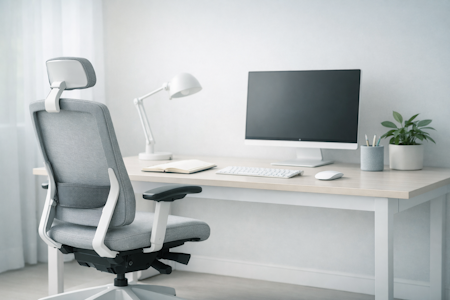
Supportive Solutions
Find ergonomic tools and thoughtful designs that bring comfort into your daily flow.
A small shift is enough to begin.