



Quick Tips…
How to Sit at Your Desk Correctly
Try these simple 2‑minute checks to Prevent Back Pain
The Ideal Setup: Spine, Arms, and Feet
Adjust your chair height so your feet rest flat on the floor and your knees form a comfortable 90-degree angle. Keep your elbows bent at 90 to 100 degrees with your wrists straight, and position your lower back firmly against your chair’s lumbar support.
Workora’s Take
Good posture isn’t about sitting like a statue; it’s about reducing unnecessary load on your spine. Setting up your chair and desk angles correctly lets your skeleton support your weight naturally, keeping fatigue at bay through long work sessions.
Quick Cues to Check Your Desk Posture

1. Primary Focal Point > Check your chair height.
Adjust your chair so your feet rest flat on the floor and your knees form a comfortable 90-degree angle. If your feet dangle, use a footrest to prevent pressure behind your thighs.
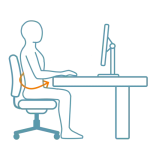
2. Gap and Angle > Check your lower back support.
Sit all the way back in your seat so your spine is fully supported by the lumbar curve. Avoid slouching forward or pulling away from the backrest as you type.
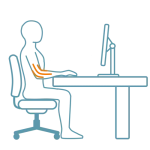
3. Viewing Distance > Verify your arm and elbow angles.
Bend your elbows at a 90 to 100-degree angle when your hands rest on the keyboard or desk surface. Keep your shoulders relaxed and down, not hunched up toward your ears.
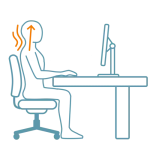
4. Screen Height > Check your head and neck alignment.
Keep your head balanced directly above your spine rather than jutting forward toward the screen. A neutral neck position relieves immense daily strain from your upper back and shoulders.
Quick Adjustments

1. Adjust your desk and keyboard height.
Position your keyboard and mouse at a height where your forearms run parallel to the floor. If your desk is too high, use a keyboard tray or adjust your chair height to eliminate shoulder shrugs
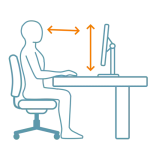
2. Position your monitor at eye level.
Set the top edge of your monitor at or slightly below eye level so your gaze rests naturally downward by about 10 to 20 degrees. This prevents neck hyperextension and reduces dry eyes.
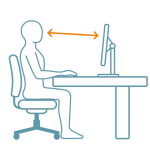
3. Check your viewing distance.
Keep your main monitor about an arm’s length away (20 to 30 inches) from your face. If you find yourself leaning or squinting forward, increase text scaling rather than hunching closer.

4. Take regular micro-movement breaks.
No static posture is meant to be held indefinitely. Stand up, stretch, or walk for a minute or two every 30 minutes to reset your muscle tension and keep your circulation flowing smoothly.
Why This Matters
Slouching or holding a misaligned posture for hours forces your spinal muscles to overcompensate, leading to chronic lower back fatigue, tight shoulders, and reduced circulation. Maintaining proper desk posture keeps your skeletal system supporting your weight efficiently, preserving your energy and comfort throughout the workday.
FAQ’s
Yes, your feet should rest flat on the floor with your knees bent at a comfortable 90-degree angle. If your desk height forces your chair up and leaves your feet dangling, use a stable footrest to relieve pressure behind your thighs.
Ensure your lower back is firmly supported by your chair’s lumbar curve and keep your monitor at eye level so your head isn’t jutting forward. Taking regular micro-breaks to reset your core and shoulder alignment also prevents fatigue-induced slumping.
Your armrests should be adjusted so your elbows bend at a 90 to 100-degree angle with your shoulders completely relaxed. They should support your forearms lightly without forcing your shoulders up toward your ears.
Related Quick Tips
Quick Tips: Is Your Screen At The Right Height?