



Quick Tips…
Are Your Shoulders Shrugging Toward Your Ears?
Quick Fixes to Relieve Upper Back and Neck Tension
The Ideal Setup: Arms, Shoulders And Armrests
Keep your shoulders relaxed and dropped downward, away from your ears. Rest your forearms comfortably with your elbows bent at a 90 to 100-degree angle, ensuring your chair’s armrests support you without pushing your shoulders upward.
Workora’s Take
Tension creeps in silently when your armrests or desk are set too high. Good ergonomics isn’t just about your lower back—keeping your shoulders relaxed and your arms level prevents upper trap strain, tension headaches, and shoulder fatigue during long work sessions.
Quick Cues to Check Your Shoulder and Arm Position
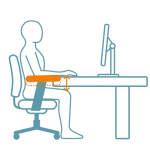
1. Armrest Height > Check your arm support.
Adjust your chair’s armrests so they lightly support your forearms without pushing your shoulders upward toward your ears.
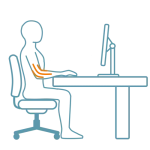
2. Elbow Bend > Check your arm angle.
Keep your elbows bent at a comfortable 90 to 100-degree angle while typing or using your mouse, avoiding any upward hiking of the shoulders.
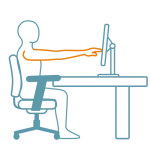
3. Upper Body Posture > Check your reach.
Sit back against your chair while keeping your arms relaxed. Reaching too far forward for your keyboard can inadvertently pull your shoulders up and forward.
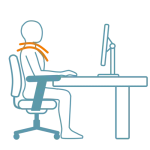
4. Shoulder Relaxation > Check for tension.
Take a conscious moment every hour to drop your shoulders down and away from your ears, releasing built-up upper trap and neck tension.
Quick Adjustments
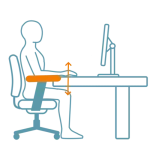
1. Adjust your armrest height.
Lower or raise your chair’s armrests so they lightly support your forearms underneath, taking the weight off your upper traps and preventing your shoulders from hiking up.
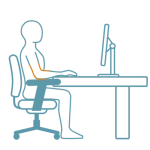
2. Check your elbow angle.
Keep your elbows bent at a comfortable 90 to 100-degree angle while typing, ensuring your desk surface isn’t forcing your arms—and consequently your shoulders—too high.
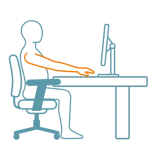
3. Avoid overreaching for peripherals.
Keep your keyboard and mouse close to prevent forward reaching, which stretches your upper back muscles and draws your shoulders up toward your ears.
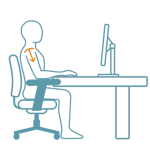
4. Take conscious shoulder drop breaks.
Set a regular reminder to pause, roll your shoulders backward, drop them away from your ears, and reset your upper body posture every 30 to 60 minutes.
Why This Matters
Shrugging your shoulders or keeping your arms unsupported for hours forces your upper traps and neck muscles to overcompensate, leading to chronic upper back tension, stiffness, and fatigue. Keeping your shoulders relaxed and your arms properly supported preserves your comfort and focus throughout the workday.
FAQ’s
This usually happens because your chair armrests or desk surface are set too high, forcing your elbows up and causing your upper traps to constantly tense without you noticing.
Keep your keyboard and mouse close to avoid reaching, use your chair’s backrest for support, and periodically check in to roll your shoulders back and down.
They should be adjusted so your forearms rest comfortably with your elbows bent at a 90 to 100-degree angle, without pushing your shoulders upward.
Related Quick Tips
Quick Tips: Is Your Keyboard in the Right Position?